
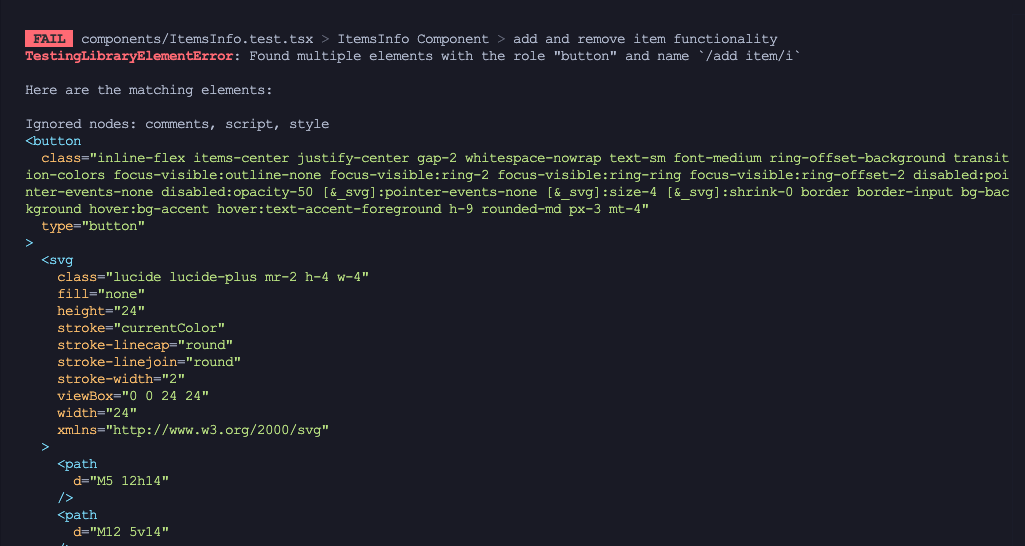
When I was grouping tests or creating a test suite in Vitest, I encountered an issue. If I rendered the same component in one test block and then rendered it again in the next test block, I got an error saying: “Found multiple elements with the role ‘button’ and name /add item/i.”
//ItemsInfo.test.tsx

import { fireEvent, render, screen } from '@testing-library/react';
import { FormProvider, useForm } from 'react-hook-form';
import { describe, expect, test } from 'vitest';
import ItemsInfo from './ItemsInfo';

//default values for the form
const defaultValues = {
    items: [{
        description: 'test item',
        quantity: 10,
        unit_price: 50,
    }]
};

function ItemsWrapper() {
    const form = useForm<any>({
        defaultValues
    });

    return <FormProvider {...form}><ItemsInfo form={form} /></FormProvider>
}


describe('ItemsInfo Component', () => {
    test('render the component', () => {
        render(<ItemsWrapper />);

        //check default item is rendered
        expect(screen.getByLabelText('Description')).toBeDefined();
        expect(screen.getByLabelText('Quantity')).toBeDefined();
        expect(screen.getByLabelText('Price')).toBeDefined();
        expect(screen.getByLabelText('item_price').textContent).toBe('$500.00');
        expect(screen.getByRole('button', { name: /remove-item/i })).toBeDefined();

        expect(screen.getByRole('button', { name: /add item/i })).toBeDefined();
    });

    test('add and remove item functionality', () => {
        render(<ItemsWrapper />);
        const addButton = screen.getByRole('button', { name: /add item/i });
        const removeButton = screen.getByRole('button', { name: /remove-item/i });

        //add item
        fireEvent.click(addButton);
        const descriptionFields = screen.getAllByLabelText('Description');
        expect(descriptionFields.length).toBe(2); //two items should be present now

        //remove item
        fireEvent.click(removeButton);
        const updatedDescriptionFields = screen.getAllByLabelText('Description');
        expect(updatedDescriptionFields.length).toBe(1); //one item should be present now
    });
});
This means the DOM wasn’t being cleared automatically after each test. Normally, the Testing Library should clean up the DOM once a test finishes to ensure that every test runs in isolation. However, Vitest doesn’t perform this cleanup by default.
Since the introduction of the automatically clean up afterEach feature, Vitest no longer triggers cleanup automatically. As a result, previously mounted components may persist and become accessible to later tests.
Easy Fix to remove “Found multiple elements” error
The quickest and easiest fix is to enable auto-cleanup after each test through your vitest.config.mts file.
Simply add the following code to that file:
test: {
  globals: true
}
This option tells Vitest to use the Testing Library’s global environment, which automatically handles setup and cleanup between tests. In other words, the DOM will be cleared after each test, ensuring every test runs in isolation without leftover components or duplicated elements.
Alternative Approach
Disabling auto-cleanup can actually be useful in some situations — for example, when you want to inspect the DOM state after a test or when multiple tests intentionally share the same rendered component.
However, if you enable auto-cleanup globally (in vitest.config.mts), Vitest will automatically clear the DOM after every test. While this ensures complete test isolation, it also means you lose control over when the cleanup happens.
If you prefer more control, you can manage cleanup manually. This approach lets you decide exactly which tests should reset the DOM and which shouldn’t. To do this, call cleanup() after each test, like so:
import { cleanup } from '@testing-library/vue'
import { afterEach } from 'vitest'

afterEach(() => {
  cleanup()
});
If you have any questions about this topic or need help with Next.js or React.js projects, feel free to reach out here.
Leave a Reply